Thursday, September 25, 2014

Orodha ya majina ya waliochaguliwa kujiunga na vyuo vikuu


Bofya jina la chuo kupakua faili lenye orodha ya majina ya waliochaguliwa

Bofya jina la chuo kupakua faili lenye orodha ya majina ya waliochaguliwa

  1. BUGANDO BScN_2014.pdf (82.4 KB)
  2. BUGANDO MD.pdf (106.2 KB)
  3. BUGANDO MEDICAL LABORATORY SCIENCES.pdf (79.7 KB)
  4. BUGANDO PHARMACY.pdf (80.0 KB)
  5. BUGANDO NURSING.pdf (76.0 KB)
  6. IFM BACHELOR DEGREE 2014
  7. MAKUMIRA PROPOSED STUDENTS 2014/2015
  8. MUM Undergraduate Selection - Direct.pdf (561.3 KB)
  9. MUM Undergraduate Selection - Equivalent.pdf (202.0 KB)
  10. SAUT Selected Students.pdf (307.3 KB)
  11. ST. AUGUSTINE 2014
  12. ST Franscis MD Batch one (52.3 KB)
  13. ST Franscis MD Batch two (37.2 KB)
  14. ST Franscis MD Batch Three (49.5 KB)
  15. Stella Maris Mtwara.pdf (283.1 KB)
  16. UDSM 2014/2015 
  17. Mwenge Catholic University

Monday, September 22, 2014

Man utd amepigwa na Leicester 5-3

 Louis van Gaal anasema Manchester United akatupa mbali kushinda katika Leicester.
Manchester United meneja Louis van Gaal alisema timu yake akatupa mbali ushindi kama Leicester akarudi kutoka nakisi ya mbili lengo kupata ajabu kushinda 5-3.


United walikuwa 3-1 mbele na dakika 30 iliyobaki kabla ya utata David Nugent adhabu umesababisha comeback.

Van Gaal alisema: "Ni si nzuri kwa sababu tulikuwa na mchezo katika mfuko wetu na akampa mbali Si kwa sababu ya Leicester, sisi alitoa mbali na mimi si kama hiyo..

"Tuna wachezaji wengi ambao wanataka kutafuta kwa lengo hilo."

Dutchman alikataa kukosoa mwamuzi Mark Clattenburg kwa si ​​kutoa adhabu kwa Jamie Vardy kwa majahazi juu ya Rafael tu nje wakati sanduku kabla ya beki wa Brazil amekubali adhabu ambayo Nugent kubadilishwa.

"Ili hukumu ya kwanza daima ni mwamuzi [ambao wewe majadiliano juu ya] lakini huna kufanya hivyo kama mchezaji," aliongeza 63 mwenye umri wa miaka.

"Unajua wewe ni katika eneo la penalti na kumruhusu mwamuzi kwa filimbi kama wewe kufanya ni changamoto. Sijui kama ni adhabu lakini sisi kuwa na kuangalia wenyewe kwa sababu sisi alifanya makosa makubwa kama timu."

Ndani ya dakika mbili za Leicester bao Esteban Cambiasso yao ya pili alikuwa aliisawazishia majeshi na, katika dakika ya mwisho 10, Jamie Vardy kuweka Mbweha mbele kabla ya adhabu Leonardo ULLOA alifanya na uhakika wa ushindi.

"Sisi hawakuridhika na milki ya mpira katika njia ya haki," alisema Van Gaal. "Leicester tayari ilionyesha dhidi ya Arsenal na Stoke kwamba wanaweza kuja nyuma na walifanya hivyo vizuri sana.

"Leicester alikuwa shots tano juu ya lengo, na kwamba alikuwa ni. Malengo haya tano walikuwa zilizopo kwa sababu sisi alifanya makosa katika milki ya mpira.

"Sisi umba mengi ya nafasi na alifanya malengo superb lakini una kufanya kwamba zaidi ya dakika 90, dakika 60 si. Ilikuwa si ​​ya kutosha. Una kuua mchezo na sisi hakufanya hivyo."


Kocha wa zamani wa Barcelona na Bayern Munich alikataa lawama utetezi wake kwa kushindwa na badala yake kuweka wajibu juu ya timu.

"Huwezi kusema ulinzi alikuwa dhaifu," alisema. "Wewe kucheza kama timu, Leicester ilionyesha kuwa. Sisi hakuwa na kucheza kama timu katika nusu ya pili na kwamba si tu ulinzi. Katika hali ya kujihami timu nzima ni wajibu, si tu beki moja."

Lakini Van Gaal haja ya haraka kushughulikia masuala ya kujihami timu yake kwa Premier League Jumamosi ijayo ya mechi dhidi ya West Ham kama yeye ni uwezekano wa kuwa na bila kusimamishwa Tyler Blackett na kujeruhiwa Jonny Evans.

Blackett alitolewa kwa mchafu juu ya Vardy, ambayo imesababisha ULLOA wa marehemu doa-kick, na itakuwa suspended juu ya Jumamosi, wakati Van Gaal lazima wakisubiri matokeo ya Scan juu ya Evans baada ya kituo cha-nyuma alilazimika kutoka uwanja katika dakika 30 na kushoto uwanja magongo.

"Mimi sijui jinsi mbaya ni," alisema Van Gaal ya kuumia Evans ya. "Sisi kuona kesho [Jumatatu], yeye pengine Scan."

Monday, September 08, 2014

DATA ENCAPSULATION & DECAPSULATION IN THE OSI MODEL

 One important piece of information to keep in mind is that data flows 2 ways in the OSI model, DOWN (data encapsulation) and UP (data decapsulation).

DATA ENCAPSULATION


Explanation:

The computer in the above picture needs to send some data to another computer. The Application layer is where the user interface exists, here the user interacts with the application he or she is using, then this data is passed to the Presentation layer and then to the Session layer. These three layer add some extra information to the original data that came from the user and then passes it to the Transport layer. Here the data is broken into smaller pieces (one piece at a time transmitted) and the TCP header is a added. At this point, the data at the Transport layer is called a segment.
Each segment is sequenced so the data stream can be put back together on the receiving side exactly as transmitted. Each segment is then handed to the Network layer for network addressing (logical addressing) and routing through the internet network. At the Network layer, we call the data (which includes at this point the transport header and the upper layer information) a packet.
The Network layer add its IP header and then sends it off to the Datalink layer. Here we call the data (which includes the Network layer header, Transport layer header and upper layer information) a frame. The Datalink layer is responsible for taking packets from the Network layer and placing them on the network medium (cable). The Datalink layer encapsulates each packet in a frame which contains the hardware address (MAC) of the source and destination computer (host) and the LLC information which identifies to which protocol in the prevoius layer (Network layer) the packet should be passed when it arrives to its destination. Also, at the end, you will notice the FCS field which is the Frame Check Sequence. This is used for error checking and is also added at the end by the Datalink layer.
If the destination computer is on a remote network, then the frame is sent to the router or gateway to be routed to the desination. To put this frame on the network, it must be put into a digital signal. Since a frame is really a logical group of 1's and 0's, the Physical layer is responsible for encapsulating these digits into a digital signal which is read by devices on the same local network.
There are also a few 1's and 0's put at the begining of the frame, only so the receiving end can synchronize with the digital signal it will be receiving.
Below is a picture of what happens when the data is received at the destination computer.

DATA DECAPSULATION


 Explanation

The receiving computer will firstly synchronize with the digital signal by reading the few extra 1's and 0's as mentioned above. Once the synchonization is complete and it receives the whole frame and passes it to the layer above it which is the Datalink layer.
The Datalink layer will do a Cyclic Redundancy Check (CRC) on the frame. This is a computation which the comupter does and if the result it gets matches the value in the FCS field, then it assumes that the frame has been received without any errors. Once that's out of the way, the Datalink layer will strip off any information or header which was put on by the remote system's Datalink layer and pass the rest (now we are moving from the Datalink layer to the Network layer, so we call the data a packet) to the above layer which is the Network layer.
At the Network layer the IP address is checked and if it matches (with the machine's own IP address) then the Network layer header, or IP header if you like, is stripped off from the packet and the rest is passed to the above layer which is the Transport layer. Here the rest of the data is now called a segment.
The segment is processed at the Transport layer, which rebuilds the data stream (at this level on the sender's computer it was actually split into pieces so they can be transferred) and acknowledges to the transmitting computer that it received each piece. It is obvious that since we are sending an ACK back to the sender from this layer that we are using TCP and not UDP. Please refer to the Protocols section for more clarification. After all that, it then happily hands the data stream to the upper-layer application.
You will find that when analysing the way data travels from one computer to another most people never analyse in detail any layers above the Transport layer. This is because the whole process of getting data from one computer to another involves usually layers 1 to 4 (Physical to Transport) or layer 5 (Session) at the most, depending on the type of data.

Thursday, August 28, 2014

Albert Einstein


Biography of albert einstein


Albert Einstein
Albert Einstein's Biography

Early life and education

Albert Einstein was born in Ulm, in the Kingdom of Württemberg
in the German Empire on 14 March 1879.His father was Hermann Einstein,
a salesman and engineer. His mother was Pauline Einstein (née Koch).
In 1880, the family moved to Munich, where his father and his uncle
founded Elektrotechnische Fabrik J. Einstein & Cie, a company that
manufactured electrical equipment based on direct current.
Marriages and children
Einstein and Maric married in January 1903. In May 1904,
the couple's first son, Hans Albert Einstein,
was born in Bern, Switzerland. Their second son, Eduard, was
born in Zurich in July 1910. In 1914,Einstein moved to Berlin,
while his wife remained in Zurich with their sons.They divorced
on 14 February 1919,having lived apart for five years.Einstein
married Elsa Löwenthal on 2 June 1919, after having had a
relationship with her since 1912. She was his first cousin
maternallyand his second cousin paternally. In 1933, they
emigrated to the United States. In 1935,Elsa Einstein was
diagnosed with heart and kidney problems and died in December 1936
Scientific career
  • Thermodynamic fluctuations and statistical physics
  • General principles
  • Theory of relativity and E = mc²
  • Photons and energy quanta
  • Quantized atomic vibrations
  • Adiabatic principle and action-angle variables
  • Wave–particle duality
  • Theory of critical opalescence
  • Zero-point energy
  • General relativity and the equivalence principle
  • Modern quantum theory
  • Bose–Einstein statistics
  • Energy momentum pseudotensor
  • Unified field theory
  • Einstein–Cartan theory
  • Equations of motion
  • Cosmology
E=mc2 Awards and honors Einstein received numerous awards and honors, including the Nobel Prize in Physics


Expert in physics

Born: 14 March 1879, Ulm, Germany
Died: 18 April 1955, Princeton, NJ, USA


Monday, August 11, 2014

 This show that transition of 3G to 4G

4G sign
Anyone who’s been in the market for a new smartphone recently isn’t just spoilt for choice when it comes to awesome Android handsets, but there’s an ever growing range of data packages and network types to choose from as well.
Of course, you’re likely familiar with the older 3G standard, but newer handsets are often listed with a variety of “next generation” communication technologies, advertised as 4G, LTE, and sometimes 4G LTE. While that may make them appear virtually identical on the store shelves, there are actually some drastic differences between the technology advertised and the actual 4G mobile communication standard.

The 4G standard

All the way back in March 2008, the International Telecommunications Union-Radio (ITU-R) decided on a set of specifications for its new 4G standard. The ITU-R is the United Nation’s official agency for all manner of information and communication technologies, and aims to help promote and regulate various communication standards across nations.
The ITU-R decided upon a set of requirements for bandwidth, spectral efficiency, and a load of other technical points, for future 4G networks. But the most important point for us users is the peak download speeds, which are defined as 100 Mbit/s for high mobility devices, such as mobile data speeds on your smartphone while driving in car, and up to approximately 1 Gbit/s for low mobility local wireless access. To put that in some perspective, typical current download speeds are often in the range of 10Mbit/s, while 4G should offer 100 times faster downloads at a rate of 1Gbit/s.
4G_LTE_WEB_en
It’s a long road, but faster data speeds are heading our way. True 4G could offer data speeds more than 10 times the current LTE download speeds.
That sounds great, but the ITU-R doesn’t have any control over implementation. As such, “first generation” 4G technologies, such as LTE or Mobile WiMAX, have been criticized for not matching up to the full specification. The reason for this is that other groups, such as 3GPP or IEEE, who work closely with the technology companies responsible for delivering the hardware, had already coordinated next-gen technologies with their members.

LTE-Advanced, the true 4G

It wasn’t until October 2010 that the ITU-R completed an assessment of six candidates to be considered true 4G technologies. After much deliberation, LTE-Advanced and WirelessMAN-Advanced were designated IMT-Advanced compliant technologies, and the age of real 4G began. LTE-Advanced is the technology that we are going to see in western markets, so here’s a little rundown of what makes LTE-A so special.
Firstly, it’s important to know that LTE-A isn’t just about handset download speeds, there’s a big push to make improvements to infrastructure in order to achieve these high download rates. LTE-A aims to improve data speeds by using a mix of traditional macro cells and vastly improved small cells. The aim is to offer better high speed coverage at the network’s edge and more bandwidth, but the transmitters will have to function on different frequency bands in order to avoid interference.
LTE carrier aggregation
The big buzzword with LTE-A is carrier aggregation, which will allow receiving handsets to make better use of these fragmented bands, in order to downloaded data faster. The LTE-A standard supports up to 5 carriers and up to 100MHz, which will enable download speeds of over 1Gbit/s. However, launch will only support the aggregation of two 10 MHz carriers, enabling peak data rates of 150 Mbit/s. The final important feature is the use of multi-antenna techniques (MIMO) and Coordinated Multi Point (CoMP) to provide more capacity and more consistent data rates across cell boundaries. In other words, you will be able to maintain a more consistant download rate as you move in and out of the range of transmitters.
However, under pressure from 3GPP and IEEE, HSPA+,WiMAX and LTE were also allowed to be labelled as 4G technologies despite not offering these features, as many companies had already begun investing in these networks during the two and a half year deliberation.

4G imposters

This has left the consumer market in a bit of a mess, allowing carriers to offer a variety of different “4G” plans for many years, despite none of them having a network which meets the official requirements. Let’s breakdown some of the technologies currently being offered as 4G, and why they don’t match up to the ITU-R standard.
4g technology table
A quick comparison of the theoretical and real world implementations of current and future network technologies. All “4G” products currently on the market are considered “pre-4G”. Source: Tech Spot
WiMAX
US consumers may remember that Sprint was the first to the “4G” market with its WiMAX technology. However this was only ever built to offer customers around 3-6Mbit/s download speeds and upload speeds of just 1 to 1.5Mbit/s, and was rightly shunned by disappointed consumers.
WiMAX fails to deliver even 1% of the theoretical peak download speed of the 4G standard created by the ITU-R. Fortunately, Sprint is phasing out WiMAX support in favour of its new LTE network.
HSPA+
HSPA+ is the pinnacle of current 3G technology, offering a theoretical 168Mbit/s downlink speed. In reality most HSPA+ coverage is only capable of 21Mbit/s, with some areas being upgraded to 42Mbit/s and occasionally even 84Mbit/s. But even the fastest implementation of HSPA+ is a long way behind the 1Gbit/s download speed required to be considered a real 4G network. But this hasn’t stopped a number of US carriers from advertising HSPA+ as 4G.
T-Mobile was one of the first companies to falsely advertise its HSPA+ network as 4G, and AT&T followed suit shortly after. Arguably AT&T is even worse, as its network started out with capabilities peaking at 14.4Mbit/s download and 5.8Mbit/s upload speeds, which is ridiculously slow for a 4G network. Users in the UK, and some other countries, will probably have noticed that some carriers actually offer HSPA+ as part of their 3G network packages. So it seems that US consumers are being sold and overcharged to use a slower network under the guise of a next generation technology.
HSPA+ vs. LTE here.
LTE
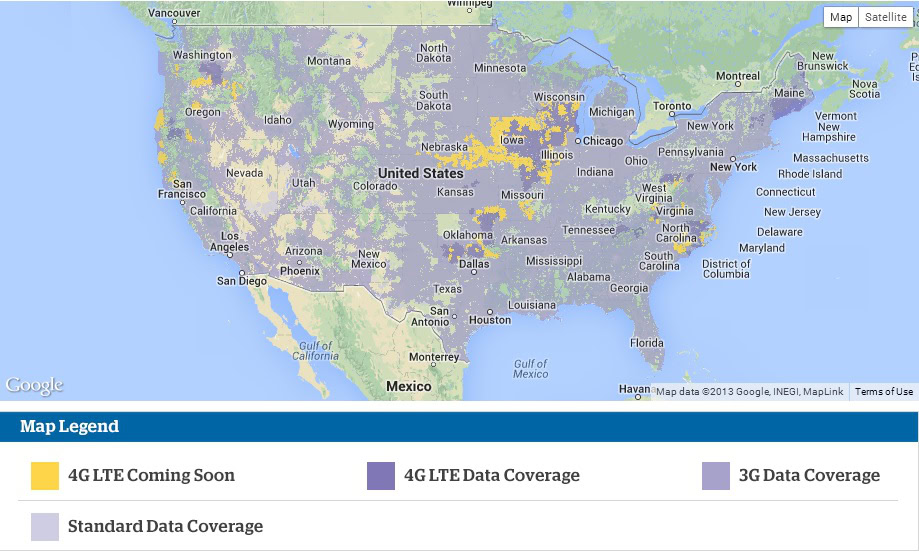
More recently, carriers have begun to offer LTE options that can theoretically offer a 100 Mbit/s download speed for mobile devices. Coverage currently varies depending on your carrier and real world data speeds are often nowhere this theoretical maximum, and are often reported to only be a tad faster than HSPA+.
US LTE coverage map
It takes a long time to upgrade an entire network, but LTE is slowing making its way across the US. Source: US Cellular
To be a little more specific about the other shortcomings of LTE, other than the lack of download speed, it’s also lacking in uplink spectral efficiency and speed, and it falls short of the true 4G capacity of 3.7 bps/Hz/cell, mainly due to the lack of carrier aggregation and multi-antenna techniques, which will enable higher speeds. LTE is a stopgap solution before the real 4G experience reaches us with the rollout of LTE-A.

Carrier marketing

If all these different technologies weren’t confusing enough, carriers have been all too keen to exploit the 4G marketing term to consumers who are seeking faster data speeds. Other than offering network types which aren’t capable of true 4G speeds, carriers are beginning to offer compromised 4G packages as they transfer their existing networks over to LTE. Take a look at AT&T’s current 4G marketing, which claims to offer users “fast 4G speeds on both the HSPA+ network and on the LTE network”.
ATT 4G marketing
Based on this advertisement, you’d assume that LTE was 2.5 times as fast as HSPA+, but the reality is often disappointing.
We already know that HSPA+ is not fast enough to be considered true 4G, and the LTE coverage areas are also surprisingly small. Despite the PR talk, this “smarter” network essentially means that you’ll be dropping down to the slightly older HSPA+ network when out of range of the LTE network, and the small print even states that 4G speeds aren’t available everywhere either. That doesn’t sound like anything promised by true 4G or LTE-A.
Fortunately companies openly offer information on their network coverage, so it’s always worth checking out exactly what coverage and speed you’ll receive in your area before deciding on a 4G contract.

When can we use “true 4G”?

The bottom line is that technically, no company yet offers a true 4G experience for consumers, but LTE-A and WM-A aren’t too far away. Having said that, current LTE data plans are a step above the older 3G networks and the pre-4G connections, and is definitely what you should look out for if you’re planning to get a device with a fast, premium mobile data experience.
The technology is only going to improve with time and, because LTE and LTE-A are fully compatible, you won’t lose out when companies finish upgrading their networks.
If you’re planning on waiting for a full 4G experience, you will need a compatible handset to achieve the full speed. A good example of this is the Korean version of the Galaxy Note 3, which makes use of the built in LTE-A modem in the Snapdragon 800 chip. LTE-A is scheduled to start rolling out in the US at some point this year.

ANGALIA PICHA ZA WASANII MBALIMBALI  WA BONGO KWENYE TAMASHA LA FIESTA JIJINI MWAZA


Wednesday, April 03, 2013

KD: Shutdown and Restart WindowsXP In Seconds!

Shutdown and Restart WindowsXP In Seconds!


What do you do to shutdown or restart your windows XP? Of course you will do the following,
  1. Click Start Menu ->
  2. Then click Turn Off Computer ->
  3. Then you get a window with three icons saying, Stand by, Turn Off and Restart ->
  4. Then you click on Turn Off button to shutdown windows and Restart button to restart your system
All this process will take 6-7 seconds and if your computer has some programs running in the background, you will get a End Now window, which will further take 4-5 seconds. What if you do the same thing in a fraction of a second.

You can surely do that by creating a Shutdown and Restart Icon on your Desktop. To do that follow the steps below,

Create A Shutdown Icon
To create a shutdown icon on your desktop do the following,
1. Right click anywhere on your desktop and select New > Shortcut
Create-New-Shortcut
2. In the new window that opens Copy paste this command,
C:\Windows\System32\shutdown.exe -s -f -t 00


PasteShutdown-Command
3. Click Next and Name it Shutdown as shown below
Name it Shutdown

4. You will get an icon as shown below,
Shutdown-icon
Clicking this Icon will Shutdown your Windows Instantly. If you don’t like the Icon Image, you can customize it too. Do the following
  1. Right Click on the shutdown Icon and select Properties a window will open as shown below,
Customize-Shutdown-Icon
2. Click Change Icon button and choose an Icon from those available,
choose-shutdown-icon
You can also download an icon of your choice and save it to your local drive. To use an icon of your choice simply click the browse button and specify the path where you have saved the icon.
3. Your new Shutdown Icon will look like this,
REd-Shutdown-Icon


Create A Restart Icon
Follow exactly all the steps discussed above to create a Restart Icon. You only need to add a different command for your Restart Icon. Here is the code for your Restart Icon,
C:\Windows\System32\shutdown.exe -r -f -t 00
After selecting an icon image you will get this,
TNT-Restart-Icon
Thats All!
I hope this may help you in saving time in Turning Off and Restarting your Windows.

KD:IT ESSENTIAL CHAPTER 15 ANSWERS

 IT ESSENTIAL PC HARDWARE AND SOFTWARE CHAPTER 15 ANSWERS

01.A technician is troubleshooting a networked computer. The technician has gathered as much information as possible from the user and now needs to verify obvious issues. Which two action should the technician perform? ( )Choose two)
• Clear the network log files;
• Change the default gateway;
• Verify the computer IP information;
• Change the router configuration;
• Check activity on the routers.

02.Which statement is true about network maintenance?
• Cable supports are used to identify the devices to which the cables are connected;
• If a network device is making an unusual sound the device should be turned off immediately;
• Educating users on IT policies and procedures is an example of proactive network maintenance;
• Preventive maintenance should not be performed regularly because it interrupts network activity.

03.A technician is concerned that a wireless router is missing current security features. What action could be taken to address this issue?
• Disable the SSID broadcast;
• Check for an updated firmware version;
• Configure mixed mode wireless operation;
• Assign static IP addresses to the wireless devices.

04.A company purchases several wireless NICs at a great price. After installing the NICs, they find that the user cannot connect to the 2,4 GHz wireless network. What is a likely cause of the problem?
• The NICs are designed for the 802.11a standard;
• The NICs are designed for the 802.11b standard;
• The NICs are designed for the 802.11g standard;
• The NICs are designed for the 802.11n standard via USB;

05.In Internet Explorer, after choosing Tools and then Internet Options, which tab would a user select to set the browser to prompt before downloading potentially unsafe content?
• Advanced;
• Content,
• Privacy;
security

06.A technician is working on a workstation that has an IP address of 169.254.25.34. The technician found that the computer cannot connect to the Internet and the network cable to the computer had been disconnected. Which command can a technician use to get a new IP address once the cable is reconnected?
• nslookup;
• net continue;
• ipconfig /renew;
• nbtstat /new.

07.Which three ports are used by SMTP, POP and IMAP ? (Choose three)
• 21
• 25
• 69
• 110
• 127
• 143

08.A technician has been asked to install a second optical drive in a computer. The technician will need to configure the drive as slave. How can the technician accomplish this desired configuration?
• Use jumpers on the motherboard to configure the drive as slave;
• List the drive as slave in the CMOS;
• Connect the drive after the twist in the PATA cable;
• Use jumpers on the drive to configure the drive as slave.

09.Which protocol provides secure transport of data from the company web server to remote users?
• HTTP
• HTTPS
• NetBEUI
• DNS

10.The network technician is researching the best way connect the branch offices to the main office. What are three main considerations that the technician should remember when choosing an Internet connection? (choose three)
• availability;
• distance;
• operating system;
• protocols;
• reliability;
• speed.

11.Which action should a user take to ensure that personal information that is entered into a website form is not retained on the computer?
• Clear the browser history;
• Change the default browser;
• Reset the file sharing permissions;
• Delete the temporary Internet files.

12.ABC Computer Company is in the process of planning a network for a new client. A network technician has been asked to perform a physical inspection of the facilities to determine the flow of data and protocols required by the client. What is this inspection called?
• data inspection;
• logical survey;
• plant inspection;
• site survey.

13.A user is reporting intermittent loss of connectivity to the network. No other users have reported similar issues. What preventive maintenance task would likely identify the problem?
• Listen for unusual sounds from the core network devices;
• Ensure that all switches have the latest firmware installed;
• Check for a damaged network cable at the user workstation;
• Verify the attachment points between network devices in the core of the network.

14.A user is receiving e-mail on a regular basis from a particular person. A problem occurs when the e-mail from this same person contains an attachment. What is one solution?
• Ask the IT department to permit port 25 through the firewall;
• Request that the person sending the e-mail attach only one picture per e-mail message;
• Check DNS settings on the computer used to receive the e-mail;
• Request that the person sending the photographs archive all e-mail messages before sending e-mail.

15.When planning the network in a new bulding, the technician notes that the company requires cabling that can extend up to 295ft (90m) with enchanged banwith support at an affordable price. Which cable type will the technician pick if he chooses the most common type of cabling used on network?
• Cat3
• Cat5
• Cat5e
• Cat6A

16.Which two protocols are used to receive e-mail? (choose two)
• DHCP
• SNMP
• IMAP
• POP3
• SSH

17.Which two hazard exist when working with fiber optic cabling (choose two)
• Chemicals;
• Copper strands;
• Electricity;
• Glass splinters;
• Connectors.

18.Students on the college network need to be able to view folder names and data in files stored on the Windows based file server, but should never be allowed to add or save information on the server. Occasionally, the students also need to run media programs to watch videos stored on the server. Which permission should the network technician assign to the students accesing the file server?
• Change;
• Execute;
• Read;
• Write.

19.A new employee needs to transfer files to the corporate FTP server. However, the employee is unable to log in to the FTP server. What is the most likely cause of the problem?
• The employee is using the wrong protocol;
• The employee is using an incorrect username or password;
• An incorrect IP address is configured in the FTP client;
• An incorrect port number is configured in the FTP client.

20.What are two ways to assign an IP address to wirekess NIC? (choose two)
• Assign a static address;
• Use ARP;
• Use the net command with the static option;
• Use WEP;
• Use the net command with the automatic option;
• Use DHCP.

Monday, March 18, 2013

KD:HOW TO MAKE WINDOW 7 GENUINE BY USING COMMAND PROMPT

HOW TO MAKE WINDOW 7 GENUINE BY
USING COMMAND PROMPT
How many of you using Genuine windows 7 ?
we all know that everyone can't buy a genuine windows 7, because cost is too high.
Lots of Windows 7 users have experienced the error message that "Windows 7 is not genuine".
This error message comes if you use pirated or OEM versions of Windows 7.
If windows 7 is not genuine, even you can't change the background wallpaper or any other display related option on your PC.
So now i'm going to show you a easy way to make your windows 7 genuine using command prompt.
How to make Windows 7 genuine using Command Prompt
Press Windows key + R
Now "run" box will appear , in "run" box type CMD
Click on OK
Note : Run CMD as Administrator
Now command prompt will appear
In command prompt type SLMGR -REARM
Hit Enter. Wait 5-10 seconds
Now a message will appear
Done !!!
Now your Windows 7 is genuine .. :D
Restart your PC once. Hereafter you won't see the warning message that "Windows 7 is not genuine"

KD:ACTIVATING WINIDOW 8 WITHOUT USING CRACK

ACTIVATING WINDOW 8 WITHOUT USING CRACK or PATCH 

I love windows 8 and its features but to be honest with you guys, I don’t have the money to purchase its license so I decide to search online to see if I’d see a crack or a patch for my windows 8. Hey! For your information guys I had no luck searching for the crack because all I could find was virus, buggy and empty cracks that crashes my system over and over again.We all know that window 8 is a new OS and the crack might be hard to find but I never gave up, so after my long search, I saw just a serial number so I decide to put the serial key manually myself and after many trial and errors, I finally made my windows 8 fully genuine.
Right now, you too can activate your windows 8 with this trick I am about to drop to be fully genuine without the fear of bug or viruses. I am ready if you’re ready…


HOW TO ACTIVATE YOUR WINDOWS 8 TO BE FULLY GENUINE


  First of all you will open your command prompt as administrator by pressing the windows key and X key together have you opened the command prompt?
        Now type exactly what you see below (Press enter after each line)


slmgr /upk


slmgr /ipk NG4HW-VH26C-733KW-K6F98-J8CK4


slmgr /skms lunar21.no-ip.org:80


slmgr.vbs -ato


Have you completed writing the above command?


If you’re done, restart your pc and voila, you have successfully activated your windows 8 to be fully genuine. Now enjoy your activated windows 8 and be limited no more…


This trick was tested on Windows 8 Professional Retail. Enjoy yourself and activate yours today.


Do you like the post? Then do click the like button, share and recommend us to friends. Oww before you go, subscribe to our feed for latest update to your mail.


Windows 8 is the latest collection to the Microsoft operating system (OS). Windows 8 has a slick design and it is also very nice to use with some extra features that will make you love it even more.

KD:Different steps for finding an ip address

 Different steps for finding an ipaddress

The IP address of your PC is unique, just as your phone number is unique. Many organizations, including the authorities, can trace your IP address to find out your host name, ISP location and the geographic area from which you connect to the Internet.[1] Follow the steps in this article to find the IP address of your PC whether you are using Windows Vista, Windows 7 or Windows XP. You'll also find instructions for finding your IP address on a Mac.

 Steps


Method One: Command Prompt

  1. 1 Access your Start Menu.

  2. 2 Hover over "All Programs".

  3. 3 Click on Accessories when the menu pops up.


  4. 4 Click on Command Prompt.


  5.  5 Type in "ipconfig" once the program comes up and hit the Enter key.


  6. 6 Search for your IP address next to IPv4.


    • Note: your IP address will be a ten-digit number.

Method Two: Windows 7 Network and Sharing Center

  1. 1 Access the Control Panel through the Start menu.


  2. 2 In the Control Panel, select Network and Internet.


  3. 3 In Network and Internet, select Network and Sharing Center.


  4. 4 In Network and Sharing Center, select Wireless Network Connection for wireless internet or Local Network Connection for wired internet.


  5. 5 Click on Details.


  6. 6 Find your IP address by looking next to IPv4 Address.


    • Note: your IP address will be a ten-digit number.

Method Three: Windows Vista

  1. 1 Open the Start menu. Right-click on Network and then choose Properties from the drop-down menu.
  2. 2 Click the View Status button beside Local Area Connection to find the IP address of a wired connection.
  3. 3 Pick the View Status button next to Wireless Network Connection to view the IP address of a wireless adapter.
  4. 4 Select Details. Your IP address will show up next to "IPv4 IP address."[2]

Method Four: Windows XP

  1. 1 Choose Start, My Network Places and then Properties.
  2. 2 Double-click Local Area Connection to find the IP address of your wired connection.
  3. 3 Double-click Wireless Network Connection to find the IP address of your wireless adapter.
  4. 4 Click Support and then Details. The window that pops up will display your computer's IP address.

Find Your IP Address on a Mac

  1. 1 Look for your IP address under System Preferences.
    • Click the Apple menu in the top left corner of your screen. Choose System Preferences.

    • Find the Network icon and click on it.

    • Find your IP address on the screen under the "Status: Connected" line.

  2. 2 Use Terminal to find your IP address.
    • Open Finder and click on Applications. Then choose Utilities.

    • Choose Terminal from the Utilities menu.

    • Type the following command: ifconfig |grep inet.

    • Look for your IP address next to the last "inet" entry.[3]